SAP Spartacus is a rapidly evolving, open-source JavaScript storefront for SAP Commerce Cloud. This guide covers how to replace and customize the default cx-storefront and cx-header components with your own custom components while leveraging CMS-driven page slots.
Table of Contents
Overview
In this guide, we’ll be replacing the out-of-the-box cx-storefront and cx-header components with our own custom components (vr-storefront and vr-header) that we can customize according to our requirements.
Benefits of Custom Components:
- Full control over layout and styling
- CMS-driven content management
- Better maintainability and scalability
- Easier to integrate custom features
Creating Custom Storefront Component
Step 1: Generate Module and Component
Create the vr-storefront module and component:
ng g m spartacus/vr-storefrontng g c spartacus/vr-storefront --exportStep 2: Extend StorefrontComponent
Create the vr-storefront component by extending the default StorefrontComponent:
Filename: vr-storefront.component.ts
import { Component, OnInit } from "@angular/core";
import { StorefrontComponent } from "@spartacus/storefront";

@Component({
    selector: "vr-storefront",
    templateUrl: "./vr-storefront.component.html",
    styleUrls: ["./vr-storefront.component.scss"],
})
export class VrStorefrontComponent extends StorefrontComponent {}
Step 3: Configure VrStorefrontModule
Import all required Spartacus modules for the storefront:
Filename: vr-storefront.module.ts
import { NgModule } from "@angular/core";
import { CommonModule } from "@angular/common";
import { VrStorefrontComponent } from "./vr-storefront.component";
import { RouterModule } from "@angular/router";
import {
    GlobalMessageComponentModule,
    OutletModule,
    OutletRefModule,
    PageLayoutModule,
    PageSlotModule,
    KeyboardFocusModule,
    SkipLinkModule,
} from "@spartacus/storefront";
import { VrHeaderModule } from "../vr-header/vr-header.module";

@NgModule({
    declarations: [VrStorefrontComponent],
    imports: [
        CommonModule,
        RouterModule,
        GlobalMessageComponentModule,
        OutletModule,
        OutletRefModule,
        PageLayoutModule,
        PageSlotModule,
        KeyboardFocusModule,
        SkipLinkModule,
        VrHeaderModule,
    ],
    exports: [VrStorefrontComponent],
})
export class VrStorefrontModule {}
Creating Custom Header Component
Step 1: Generate Header Module and Component
Create the vr-header module and component:
ng g m spartacus/vr-storefront/vr-headerng g c spartacus/vr-storefront/vr-header --exportImplementing CMS-Driven Slots
Storefront Template
Replace the default cx-storefront with vr-storefront in your storefront template:
Filename: vr-storefront.component.html
<ng-template [cxOutlet]="StorefrontOutlets.STOREFRONT" cxPageTemplateStyle>
    <ng-template cxOutlet="cx-header">
        <header
            cxSkipLink="cx-header"
            [cxFocus]="{ disableMouseFocus: true }"
            [class.is-expanded]="isExpanded$ | async"
            (keydown.escape)="collapseMenu()"
            (click)="collapseMenuIfClickOutside($event)"
        >
            <!-- Added default class and section to match the same UI-->
            <vr-header section="header" class="header"></vr-header>
        </header>
        <cx-page-slot position="BottomHeaderSlot"></cx-page-slot>
        <cx-global-message
            aria-atomic="true"
            aria-live="assertive"
        ></cx-global-message>
    </ng-template>

    <main cxSkipLink="cx-main" [cxFocus]="{ disableMouseFocus: true }">
        <router-outlet></router-outlet>
    </main>

    <ng-template cxOutlet="cx-footer">
        <footer cxSkipLink="cx-footer" [cxFocus]="{ disableMouseFocus: true }">
            <cx-page-layout section="footer"></cx-page-layout>
        </footer>
    </ng-template>
</ng-template>
Header Template with CMS Slots
Implement the header component with CMS-driven page slots for editable content:
Filename: vr-header.component.html
<cx-page-slot position="PreHeader"></cx-page-slot>
<cx-page-slot position="SiteContext"></cx-page-slot>
<cx-page-slot position="SiteLinks"></cx-page-slot>
<cx-page-slot position="SiteLogo"></cx-page-slot>
<cx-page-slot position="SearchBox"></cx-page-slot>
<cx-page-slot position="SiteLogin"></cx-page-slot>
<cx-page-slot position="MiniCart"></cx-page-slot>
<cx-page-slot position="NavigationBar"></cx-page-slot>
Page Slot Descriptions:
| Position | Purpose | Content Type |
|---|---|---|
| PreHeader | Content before main header | Generic links, promo |
| SiteContext | Site context selector | Language/currency |
| SiteLinks | Quick navigation links | Generic links |
| SiteLogo | Company logo | Image/link |
| SearchBox | Product search component | Search functionality |
| SiteLogin | Login/Account links | Account-related |
| MiniCart | Shopping cart summary | Cart component |
| NavigationBar | Main navigation menu | Navigation component |
Note: We can change the component mapping according to our requirements and update the
cx-page-slotaccordingly. In this guide we are showing the default slots present in the header. You can add or remove slots based on your specific CMS configuration.
Module Configuration
Header Module Setup
Import all required dependencies in the VrHeaderModule:
Filename: vr-header.module.ts
import { NgModule } from "@angular/core";
import { CommonModule } from "@angular/common";
import { VrHeaderComponent } from "./vr-header.component";
import { RouterModule } from "@angular/router";
import { UrlModule, I18nModule } from "@spartacus/core";
import {
    GenericLinkModule,
    PageSlotModule,
    SearchBoxModule,
    IconModule,
    MiniCartModule,
    NavigationModule,
} from "@spartacus/storefront";

@NgModule({
    declarations: [VrHeaderComponent],
    imports: [
        CommonModule,
        GenericLinkModule,
        PageSlotModule,
        SearchBoxModule,
        IconModule,
        MiniCartModule,
        UrlModule,
        NavigationModule,
        I18nModule,
        RouterModule,
    ],
    exports: [VrHeaderComponent],
})
export class VrHeaderModule {}
AppModule Integration
Import the VrStorefrontModule in your main application module:
Filename: app.module.ts
import { NgModule } from "@angular/core";
import { BrowserModule } from "@angular/platform-browser";
import { AppComponent } from "./app.component";
import { VrStorefrontModule } from "./spartacus/vr-storefront/vr-storefront.module";

@NgModule({
    declarations: [AppComponent],
    imports: [
        BrowserModule,
        // Other imports
        VrStorefrontModule,
    ],
    providers: [],
    bootstrap: [AppComponent],
})
export class AppModule {}
Integration and Testing
Replace Default Storefront
Replace the cx-storefront component with vr-storefront in your application template:
Filename: app.component.html
<!-- <cx-storefront></cx-storefront> -->
<vr-storefront></vr-storefront>
Verify Setup
After completing the setup, your custom storefront should display correctly:
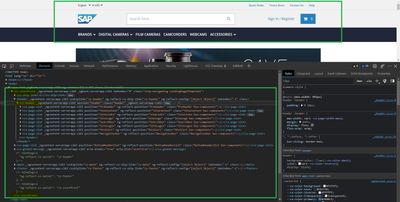
If you have done the setup correctly, the page should render with your custom components while maintaining the same UI and functionality as the default Spartacus storefront.
Best Practices
Component Design
- Keep components focused - Each component should have a single responsibility
- Use content projection - Allow flexible content placement via page slots
- Leverage CMS - Use page slots for editable content instead of hard-coding
- Maintain accessibility - Use proper ARIA attributes and semantic HTML
Module Organization
- Feature modules - Group related components into feature modules
- Lazy loading - Load modules only when needed
- Shared modules - Create shared modules for commonly used components
- Dependency imports - Import only required Spartacus modules
Configuration Tips
- CMS Integration - Map custom components to CMS content types
- Styling - Use SCSS/CSS to maintain consistent branding
- Testing - Create unit tests for all custom components
- Documentation - Document custom components and page slots