Angular is a powerful TypeScript-based framework for building dynamic single-page applications (SPAs). This comprehensive guide covers all essential concepts from components to routing, helping you master Angular fundamentals.
Table of Contents
What is Angular?
Angular is a framework used for building client-side applications. It’s primarily used for creating single-page applications (SPAs) and modern web apps.
Evolution
- AngularJS (Angular 1): Released in 2010
- Angular 2+: Modern version with significant improvements and TypeScript support
Core Principles
- Component-Based: Built on reusable, encapsulated components
- DRY (Don’t Repeat Yourself): Emphasizes code reusability and maintainability
- TypeScript: Fully typed language for better developer experience
- MVC Pattern: Separation of concerns with Model, View, and Controller
Data Binding
Data binding is the automatic synchronization of data between the component class and the template. Angular provides four types of data binding:
1. String Interpolation {{ }}
Displays component data in the template:
<p>{{ username }}</p>2. Property Binding [ ]
Binds component property to element property:
<img [src]="imageUrl" [alt]="imageName" />
<button [disabled]="isDisabled">Click Me</button>
3. Event Binding ( )
Responds to user actions:
<button (click)="onClick()">Submit</button> <input (keyup)="onKeyUp($event)" />4. Two-Way Binding [( )]
Combines property and event binding for automatic synchronization:
<input [(ngModel)]="username" />Features of Angular
Angular includes many powerful features for modern web development:
| Feature | Purpose |
|---|---|
| Modules | Organize business logic into cohesive blocks |
| Components | Reusable building blocks with logic and templates |
| Services | Shared functionality across components |
| Directives | Extend and enhance HTML elements |
| Routing | Manage application navigation and URLs |
| Forms | Handle user input with validation |
| HTTP | Communicate with backend APIs |
| Observables | Handle asynchronous data streams |
| Pipes | Transform data for display |
| Guards | Protect routes with authentication/authorization |
| Interceptors | Intercept HTTP requests and responses |
| Testing | Built-in testing capabilities with Jasmine/Karma |
| Components | Services | Routing |
| Testing | Build Tools | Data Binding |
| Templating | HTTP Modules | Observables |
| Forms Module | Directives | Pipes |
| Events | Animation | Typescript |
Key Components of Angular
1. Components
The basic building blocks of an Angular UI. They combine a template (HTML), styles (CSS), and logic (TypeScript).
2. Services
Classes that encapsulate business logic and can be reused across the application through dependency injection.
3. Directives
Markers on DOM elements that extend HTML functionality and behavior. Examples: *ngIf, *ngFor, @Directive
4. Pipes
Transform data for display in templates. Examples: {{ date | date:'short' }}, {{ price | currency }}
5. Metadata
Decorators that configure classes and add behavior. Examples: @Component, @Injectable, @Input, @Output
6. Modules
Containers that organize related functionality into cohesive blocks. Every Angular app has at least one root module.
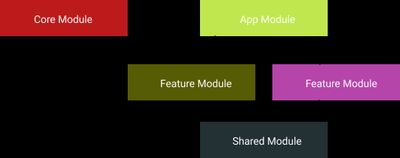
Module Configuration Example:
@NgModule({
    declarations: [
        // Components, Directives, Pipes used in this module
        AppComponent,
        MyComponent,
    ],

    imports: [
        // Import other modules needed here
        BrowserModule,
        HttpClientModule,
    ],

    exports: [
        // Make these publicly available to other modules
        MyComponent,
    ],

    providers: [
        // Register services and guards for dependency injection
        MyService,
        AuthGuard,
    ],

    bootstrap: [
        // Root component to load on startup
        AppComponent,
    ],
})
export class AppModule {}
7. Templates
Angular templates are regular HTML with additional Angular features like interpolation, binding, and directives.
Angular app structure
- Application source
The application itself- Angular App
our modules
routes
components and services- Angular Bootstrap
main.ts;
polyfill.ts;
test.ts;
index.html;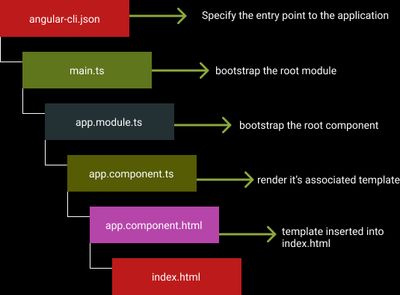
- Configuration
ts config
npm pkgs
scripts
webpack config
express server
Lifecycle Hooks of Angular
Angular components go through a lifecycle from creation to destruction. You can tap into key moments using lifecycle hooks:
| Hook | Timing | Use Cases |
|---|---|---|
| ngOnChanges() | Before/after input properties change | React to @Input changes |
| ngOnInit() | After first property binding | Initialize component data, fetch from API |
| ngDoCheck() | On every change detection cycle | Custom change detection logic |
| ngAfterContentInit() | After content is projected | Access projected content |
| ngAfterContentChecked() | After content projection checked | Respond to projected content changes |
| ngAfterViewInit() | After view is initialized | Access @ViewChild elements |
| ngAfterViewChecked() | After view checked on each cycle | Respond to view changes |
| ngOnDestroy() | Before component is destroyed | Cleanup subscriptions, timers, etc. |
Example Implementation:
import { Component, OnInit, OnDestroy } from "@angular/core";

@Component({
    selector: "app-example",
    template: `<p>{{ message }}</p>`,
})
export class ExampleComponent implements OnInit, OnDestroy {
    message = "";

    ngOnInit() {
        this.message = "Component initialized";
        // Fetch data, setup subscriptions
    }

    ngOnDestroy() {
        // Cleanup: unsubscribe, clear timers
        console.log("Component destroyed");
    }
}
Best Practices & Key Points
Subscription & Memory Management
- Never subscribe in services - Always subscribe in components
- Unsubscribe on destroy - Prevent memory leaks by unsubscribing in
ngOnDestroy() - Use Async Pipe - Automatically handles subscriptions:
{{ observable$ | async }}
Data Communication
- Parent to Child: Use
@Input()decorator - Child to Parent: Use
@Output()with EventEmitter - No relation: Use Services with BehaviorSubject
- Complex state: Use state management (NgRx, Akita)
Component Design
- Single Responsibility: Each file should have only one task
- Folder Structure: Maintain organized folder hierarchy
- Naming Conventions: Follow BEM (Block, Element, Modifier) for CSS
- Code Readability: Write clear, self-documenting code
API & HTTP Handling
- Always handle errors: Wrap API calls in try-catch or use RxJS error operators
- Use templating: Use template literals for API URLs
- Typed Responses: Define interfaces for API responses
Forms & Validation
- Reactive Forms: Preferred over Template-driven forms
- Form Validation: Use built-in validators and custom validators
- Error Handling: Show validation messages to users
Debugging & Development
- Use debugger: Prefer debugger over console.log
- Router: Use
routerLink="/path"androuterLinkActive="active" - State Management: Transfer data between routes using state, not query params
MVC Architecture
Angular follows the MVC (Model-View-Controller) pattern:
┌─────────────────────────────────────┐
│         Model (Data)                │
│    (Service + TypeScript)           │
└──────────────┬──────────────────────┘
               │
        ┌──────┴───────┐
        │              │
┌───────▼────────┐  ┌──▼──────────────┐
│  Controller    │  │    View         │
│  (Component)   │  │ (Template/HTML) │
│  - Logic       │  │ - Presentation  │
│  - Calculations│  │ - User Interaction
└────────────────┘  └─────────────────┘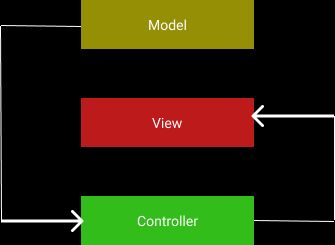
Key Point: Keep logic in the controller and data presentation in the view.
CLI Shortcuts
| Shortcut | Command | Purpose |
|---|---|---|
| Create component | ng g c componentName | Generate new component |
| Create service | ng g s serviceName | Generate new service |
| Create directive | ng g d directiveName | Generate new directive |
| Create pipe | ng g p pipeName | Generate new pipe |
| Create module | ng g m moduleName | Generate new module |
| Create guard | ng g g guardName | Generate new guard |
| Run app | ng serve | Start dev server |
| Run on port | ng serve --port=4200 | Specify custom port |
| Build app | ng build | Production build |
| Run tests | ng test | Run unit tests |
Forms & Validation
Form Validation Types
| Validation | Description | Example |
|---|---|---|
| required | Field must have a value | Validators.required |
| Valid email format | Validators.email | |
| minlength | Minimum character length | Validators.minLength(6) |
| maxlength | Maximum character length | Validators.maxLength(20) |
| pattern | Regex pattern matching | Validators.pattern(/^[0-9]*$/) |
| custom | Custom validation logic | Create custom validator function |
Form State Classes
Angular automatically applies CSS classes based on form state:
| Class | Meaning |
|---|---|
ng-valid | Field passes validation |
ng-invalid | Field fails validation |
ng-touched | User has interacted with field |
ng-untouched | User hasn’t interacted yet |
ng-pristine | Form hasn’t been modified |
ng-dirty | Form has been modified |
Reactive Forms Example
import {
    ReactiveFormsModule,
    FormBuilder,
    FormGroup,
    Validators,
} from "@angular/forms";

@Component({
    selector: "app-form",
    template: `
        <form [formGroup]="form">
            <input
                formControlName="email"
                type="email"
                placeholder="Enter email"
            />
            <span
                *ngIf="form.get('email').invalid && form.get('email').touched"
            >
                Invalid email
            </span>
            <button [disabled]="form.invalid">Submit</button>
        </form>
    `,
})
export class FormComponent implements OnInit {
    form: FormGroup;

    constructor(private fb: FormBuilder) {}

    ngOnInit() {
        this.form = this.fb.group({
            email: ["", [Validators.required, Validators.email]],
            password: ["", [Validators.required, Validators.minLength(8)]],
        });
    }
}
HTTP Methods in Angular
Angular provides HTTP methods for backend communication:
// GET - Retrieve data
this.http.get("/api/users");

// POST - Create new data
this.http.post("/api/users", newUser);

// PUT - Update existing data
this.http.put("/api/users/1", updatedUser);

// DELETE - Remove data
this.http.delete("/api/users/1");